By default when Android application is installed for example via debugger, id only has permissions defined in it’s AndroidManifest.xml. But that’s actually not true, as some permissions cannot be given to regulary installed apps (e.g. android.permission.BROADCAST_SMS). To enable all posible permissions, application needs to be installed as a System App.
System apps are installed by placing signed apk’s into /system/app/<app-name>/ directory.
We’ll simulate installation of such example that in Android emulator.
To enable access to ‘/system/app/’ directory, we’ll first need to root the emulator. This will also require a different image and a way of starting an emulator
Virtual Device Configuration
When creating Virtual Device, do not select Recomended image as it’s not rootable. Select X86-image (as I’m using AMD64 proc) and then select Android Q, as shown in screenshot below.
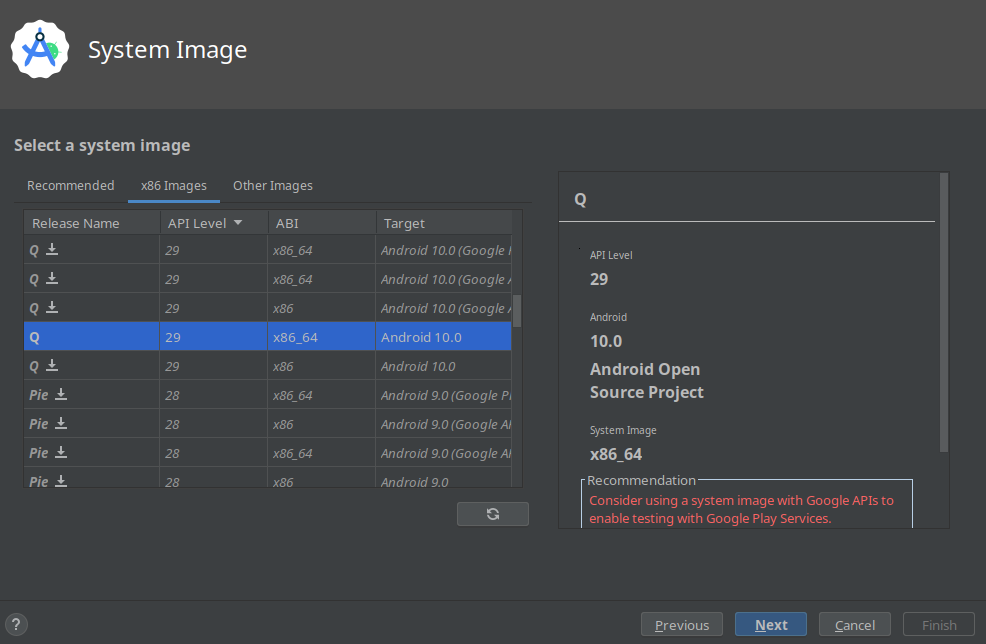
Remaining steps are not important.
Starting Emulator and Rooting Device
~/Android/Sdk/emulator/emulator -avd Pixel_2_API_29  -selinux disabled -writable-system    -qemu -enable-kvm

DEVICEID=<device-id>

~/Android/Sdk/platform-tools/adb -s $DEVICEID root
~/Android/Sdk/platform-tools/adb -s $DEVICEID shell avbctl disable-verification
~/Android/Sdk/platform-tools/adb -s $DEVICEID disable-verity
~/Android/Sdk/platform-tools/adb -s $DEVICEID reboot
# Wait for reboot
Copying signed APK to device to /system/app/*/ directory
APPDIR=demo
APKNAME=demo.apk
LOCALPATH=~/local/path/to/$APKNAME
DEVICEID=<device-id>

~/Android/Sdk/platform-tools/adb -s $DEVICEID root
~/Android/Sdk/platform-tools/adb -s $DEVICEID remount

~/Android/Sdk/platform-tools/adb -s $DEVICEID shell su root mkdir /system/app/$APPDIR
~/Android/Sdk/platform-tools/adb -s $DEVICEID push $LOCALPATH /sdcard
~/Android/Sdk/platform-tools/adb -s $DEVICEID shell su root mv /sdcard/$APKNAME /system/app/$APPDIR
~/Android/Sdk/platform-tools/adb -s $DEVICEID shell su root restorecon -R /system/app/$APPDIR
~/Android/Sdk/platform-tools/adb -s $DEVICEID shell su root chmod 0755 /system/app/$APPDIR/$APKNAME

~/Android/Sdk/platform-tools/adb -s $DEVICEID reboot
After the device is rebooted, application should be installed as service app and is no longer removable via Android uninstall API.
To uninstall the app, the /system/app/demo directory should be removed, and android restarted.