The goal of this test is to see how Elasticsearch behaves with heavy insert load of logs.
The Elasticsearch (8.15.3) is running within KVM VM with 2 cores and further restricted via cgroupv2 cpu.max parameter set to “25 100”, to give a quarter of core performance distributed over to given cores.
Input log-set total size is around 60GiB of random log data, and a Rust client performing batch inserts to Elasticsearch.
Findings
Elasticsearch batch insert performance was quite impressive (at least compared to PostgreSQL bulk insert). The log consumption rate was above 3 MiB, when merging was not active, and around 1.8 Mib when it was.
The consumption did not decrease with time (as it did on PostgreSQL), and was basically the same till the end.
I don’t have the graph of consumption related to reading log file, but I have node-exporter graphs for KVM instance.
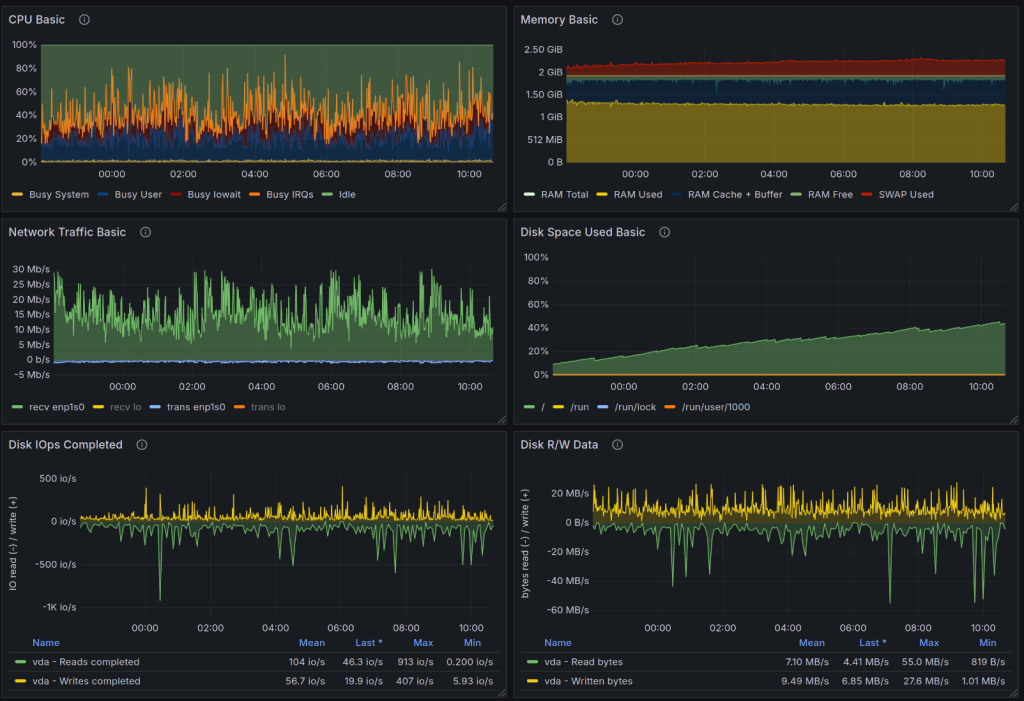
Setup
Sender configuration
A single Rust client sending logs in sequence. The writes are not parallelized.
use std::cell::RefCell;
use std::fs::File;
use std::io::{BufRead, BufReader};
use std::ops::Sub;
use anyhow::{Result, anyhow};
use chrono::{DateTime, Utc};
use itertools::Itertools;
use chrono::Local;
use elasticsearch::{BulkParts, Elasticsearch, IndexParts};
use elasticsearch::http::request::JsonBody;
use elasticsearch::http::transport::Transport;
use serde_json::json;
fn file_paths() -> Vec<String> {
vec![
"/home/user/logs/app.log"
].into_iter().map(|e| e.to_string()).collect()
}
#[derive(Debug)]
struct LogRecord {
timestamp: DateTime<Utc>,
timestamp_str: String,
msg: String,
}
struct LogReader {
log_files: Vec<String>,
log_file_pos: usize,
reader: RefCell<Option<BufReader<File>>>,
now: DateTime<Local>,
bytes_read: usize,
}
impl LogReader {
fn new(log_files: Vec<String>) -> LogReader {
Self { log_files, log_file_pos: 0, reader: RefCell::new(None), now: Local::now(), bytes_read: 0 }
}
fn read_batch(&mut self, size: usize) -> Result<Vec<LogRecord>> {
let mut recs = vec![];
if self.reader.borrow().is_none() {
if self.log_file_pos >= self.log_files.len() {
return Ok(recs);
}
let path = &self.log_files[self.log_file_pos];
let reader = BufReader::with_capacity(1024 * 1024 * 16, File::open(path)?);
self.reader.borrow_mut().replace(reader);
self.log_file_pos += 1;
}
loop {
let mut line = String::new();
let len = self.reader.borrow_mut().as_mut().unwrap().read_line(&mut line)?;
if len == 0 {
break;
}
self.bytes_read += len + 1 /* - for newline */;
let mut iter = line.split(" ").into_iter();
let timestamp = iter.next().ok_or(anyhow!("Bad file"))?.to_string();
let message = iter.collect_vec().join(" ");
let time = chrono::NaiveDateTime::parse_from_str(×tamp, "%Y-%m-%dT%H:%M:%S.%3f")?;
let time = time.and_utc();
let time = time.with_timezone(&Utc);
recs.push(LogRecord {
timestamp: time,
timestamp_str: timestamp,
msg: message,
});
let now = Local::now();
if now.sub(self.now).num_milliseconds() > 1000 {
let ms = now.sub(self.now).num_milliseconds();
println!("in {ms} written {} bytes, {} KiB, {} MiB read", self.bytes_read, self.bytes_read / 1024, self.bytes_read / 1024 / 1024);
self.bytes_read = 0;
self.now = now;
}
if recs.len() == size {
return Ok(recs);
}
}
self.reader.borrow_mut().take();
recs.append(&mut self.read_batch(size - recs.len())?);
Ok(recs)
}
}
#[tokio::main]
async fn main() -> Result<()> {
let paths = file_paths();
let mut reader = LogReader::new(paths);
let transport = Transport::single_node("http://192.168.122.134:9200")?;
let client = Elasticsearch::new(transport);
let mut id = 1_u64;
loop {
let z = reader.read_batch(8000)?;
if z.len() == 0 {
println!("Received zero records");
continue;
}
let mut body: Vec<JsonBody<_>> = Vec::with_capacity(z.len()*2);
for r in z {
body.push(json!({"index": {}}).into());
body.push(json!({
"id": id,
"@timestamp": r.timestamp_str,
"message": r.msg
}).into());
id+=1;
}
let response = client
.bulk(BulkParts::Index("logs-13"))
.body(body)
.send()
.await?;
if response.status_code().is_server_error() {
eprintln!("Bad status {}", response.status_code());
}
if response.status_code().is_client_error() {
eprintln!("Bad status {}", response.status_code());
}
;
}
Ok(())
}
Elasticsearch configuration
The following `elasticsearch.yaml` file was used during testing:
 ======================== Elasticsearch Configuration =========================
#
# NOTE: Elasticsearch comes with reasonable defaults for most settings.
#       Before you set out to tweak and tune the configuration, make sure you
#       understand what are you trying to accomplish and the consequences.
#
# The primary way of configuring a node is via this file. This template lists
# the most important settings you may want to configure for a production cluster.
#
# Please consult the documentation for further information on configuration options:
# https://www.elastic.co/guide/en/elasticsearch/reference/index.html
#
# ---------------------------------- Cluster -----------------------------------
#
# Use a descriptive name for your cluster:
#
#cluster.name: my-application
#
# ------------------------------------ Node ------------------------------------
#
# Use a descriptive name for the node:
#
#node.name: node-1
#
# Add custom attributes to the node:
#
#node.attr.rack: r1
#
# ----------------------------------- Paths ------------------------------------
#
# Path to directory where to store the data (separate multiple locations by comma):
#
path.data: /var/lib/elasticsearch
#
# Path to log files:
#
path.logs: /var/log/elasticsearch
#
# ----------------------------------- Memory -----------------------------------
#
# Lock the memory on startup:
#
#bootstrap.memory_lock: true
#
# Make sure that the heap size is set to about half the memory available
# on the system and that the owner of the process is allowed to use this
# limit.
#
# Elasticsearch performs poorly when the system is swapping the memory.
#
# ---------------------------------- Network -----------------------------------
#
# By default Elasticsearch is only accessible on localhost. Set a different
# address here to expose this node on the network:
#
network.host: 0.0.0.0
#
# By default Elasticsearch listens for HTTP traffic on the first free port it
# finds starting at 9200. Set a specific HTTP port here:
#
#http.port: 9200
#
# For more information, consult the network module documentation.
#
# --------------------------------- Discovery ----------------------------------
#
# Pass an initial list of hosts to perform discovery when this node is started:
# The default list of hosts is ["127.0.0.1", "[::1]"]
#
#discovery.seed_hosts: ["host1", "host2"]
#
# Bootstrap the cluster using an initial set of master-eligible nodes:
#
#cluster.initial_master_nodes: ["node-1", "node-2"]
#
# For more information, consult the discovery and cluster formation module documentation.
#
# ---------------------------------- Various -----------------------------------
#
# Allow wildcard deletion of indices:
#
#action.destructive_requires_name: false

#----------------------- BEGIN SECURITY AUTO CONFIGURATION -----------------------
#
# The following settings, TLS certificates, and keys have been automatically
# generated to configure Elasticsearch security features on 07-11-2024 21:52:51
#
# --------------------------------------------------------------------------------

# Enable security features
xpack.security.enabled: false

xpack.security.enrollment.enabled: true

# Enable encryption for HTTP API client connections, such as Kibana, Logstash, and Agents
xpack.security.http.ssl:
  enabled: false
  keystore.path: certs/http.p12

# Enable encryption and mutual authentication between cluster nodes
xpack.security.transport.ssl:
  enabled: false
  verification_mode: certificate
  keystore.path: certs/transport.p12
  truststore.path: certs/transport.p12
# Create a new cluster with the current node only
# Additional nodes can still join the cluster later
cluster.initial_master_nodes: ["elasticsearch"]

# Allow HTTP API connections from anywhere
# Connections are encrypted and require user authentication
http.host: 0.0.0.0

# Allow other nodes to join the cluster from anywhere
# Connections are encrypted and mutually authenticated
#transport.host: 0.0.0.0

#----------------------- END SECURITY AUTO CONFIGURATION -------------------------

## Disable geoip downloader
ingest.geoip.downloader.enabled: false
KVM Configuration
Typical 2 core setup with 2 GiB of RAM, but with following agumentation.
Block device limits
  <iotune>
    <total_bytes_sec>125829120</total_bytes_sec>
    <total_iops_sec>3000</total_iops_sec>
  </iotune>
Network device limits
  <bandwidth>
    <inbound average="12000" peak="12000" burst="12000"/>
    <outbound average="12000" peak="12000"/>
  </bandwidth>